You read a short situation: the campus gym changed its hours, or a classmate asked to swap study slots, or a workshop you signed up for got moved. Below it sit three short instructions telling you exactly what your email has to do. A seven-minute timer is already running, and the cursor is blinking in an empty message body.1
That is Write an Email, one of three tasks in the redesigned TOEFL 2026 Writing section.2 It rewards a skill the old test never measured directly: writing a clear, polite, complete message quickly, in the right tone for the person reading it. Test-takers with strong academic English often underperform here, because they write long, formal, essay-style paragraphs when the task wants a tight 110-word email that simply does three jobs. By the end of this guide you will know what the screen shows, how the AI rubric splits your score, a six-step routine for one email, and the drills that make this task feel automatic.
The task is new in the format ETS launched on January 21, 2026, which replaced the old integrated and independent essays with three shorter, practical writing tasks.3 For the whole-exam picture, including how the Writing band fits your overall score, start with the TOEFL 2026 test format guide; this page covers only the email.
What you see on test day
Writing is the third section of the 2026 test, after Reading and Listening, and it runs about 23 minutes for all three tasks.45 The three tasks go back to back, each with its own timer, and you cannot move leftover time from one task to the next.1 Write an Email gets 7 minutes of that window.61
The screen has two parts. On the left is a scenario of roughly 90 words describing a realistic situation from school, work, or daily life, followed by a short instruction listing what your email must cover, usually three separate points.1 ETS describes the task as writing "an email in an academic or social situation, such as making a request, giving information, or proposing a solution."2 On the right is the email itself, with the recipient and subject line already filled in for you and a blank body where you type your reply.
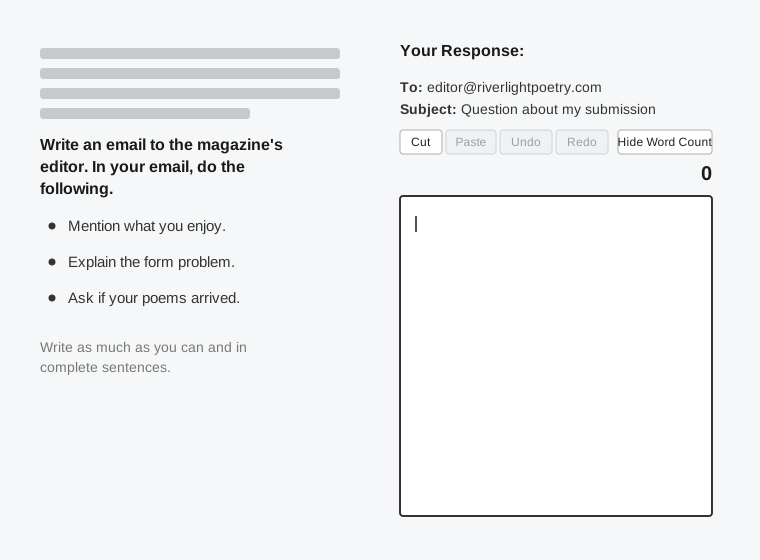
Each of the three points is a job you have to complete. A typical prompt might tell you to explain why you cannot attend an event, ask one question about a refund, and suggest an alternative. The scorer treats those three instructions as a checklist.16 There is no spell-check or grammar-check tool in the response box, and a blank or non-English response can flag your entire Writing section as unscorable, so something on topic always beats nothing.1
What it really tests
Underneath, this task checks whether you can do everyday things in English, asking for something, apologizing, giving information, or suggesting an idea, using the right tone (or "register") for the situation, and doing it under time pressure. This is a different skill from the one the old Independent essay tested. Essays rewarded length and long arguments. The email rewards being short, clear, and polite.
Two smaller skills carry most of the score. The first is reading the relationship correctly: the same request sounds right to a friend but wrong to a school office, and the prompt always tells you who the reader is, so the tone is decided for you if you notice it. The second is answering every point with enough detail to be convincing, without adding filler. Someone who writes beautiful sentences but answers only two of the three points has misunderstood what the task is for.
What the task does not reward is fancy vocabulary or complex arguments used just to show off. ETS says scoring "focuses on how clearly and effectively you communicate your ideas, not on writing a perfect first draft."2 Treat it as a real email you would be happy to send.
How the Write an Email task is scored
Your email is rated on a 0 to 5 scale.64 That single task score then combines with your Build a Sentence and Academic Discussion scores into the Writing section band, reported from 1.0 to 6.0 in half-point steps.47 You never see the per-task number on your report; you see the section band.
ETS uses automated scoring for the new writing tasks, the same family of engine (e-rater) it has long used on writing, with some sources reporting that the email and discussion tasks receive a combined automated and human read.54 What matters for your prep is what that scoring values, and the rubric is consistent across the major prep breakdowns. Four dimensions are evaluated, and they are not equally weighted; they run roughly in this order of importance:18
- Purposeful communication. Did you address every point in the prompt, clearly and with enough development? This is the heaviest factor and the one most missed points come from.
- Social conventions and tone. Is the register right for the recipient, with an appropriate greeting and closing?
- Language use. Grammar and vocabulary: are your sentences accurate and varied enough to carry the meaning?
- Mechanics. Spelling and punctuation, weighted least but still visible.
The band descriptors line up like this:1
| Score | What the response looks like |
|---|---|
| 5 | All points addressed clearly with specific detail. Tone fits the reader. Grammar and vocabulary are accurate and varied, with only very minor slips. |
| 4 | Strong and complete, with minor issues in tone, connectors, or accuracy that do not block the message. |
| 3 | A point is thin or missing, or grammar errors start to affect clarity. The reader still mostly follows it. |
| 2 | Two points underdeveloped or the task partly misunderstood; errors make parts hard to read. |
| 1 | Minimal relevant content; very hard to follow. |
| 0 | Blank, off topic, copied from the prompt, or not in English. |
Two things about the scoring are worth remembering. First, completeness beats polish. A plain email that does all three jobs outscores an elegant one that does two, because purposeful communication sits at the top of the rubric.1 Second, the scorer does not fact-check. Your reasons, names, and dates can be entirely invented, and concrete invented detail scores better than vague honesty, because it gives the engine more real language to evaluate and reads as a natural message.16
The strategy, step by step
Seven minutes is enough to write a calm, complete email if you spend the first minute planning instead of typing. Here is the routine.
Read the scenario for the relationship first
Before anything else, find out who you are writing to and how you know them. A professor, a campus office, or a landlord calls for a semi-formal register; a classmate or a friend calls for a relaxed one.65 That one decision controls your greeting, your sign-off, and your word choices for the whole email, so choose it on purpose rather than just always being as formal as possible.
Turn the three points into three jobs
Read the instruction and pin down each thing you must do. Most prompts ask for three: often a reason or explanation, a question, and a suggestion or request. Note the verb in each one. "Explain," "ask," and "suggest" are different actions, and the fastest way to drop a point is to answer "explain" twice and never actually ask the question.1 Spend about 60 seconds here.1
State your purpose in the first sentence
After a one-line greeting, open with why you are writing. "I'm writing to let you know I won't be able to make Saturday's trip, and to ask about a couple of things." A reader (and a scorer) should know your purpose by the end of sentence one. Do not warm up with weather or filler; the rubric rewards getting to the point.
Give each point its own short paragraph with one concrete detail
Devote a couple of sentences to each instruction, and attach one specific detail to each: a name, a time, a number, a reason. "I've come down with the flu and my doctor told me to rest for the week" beats "I am unable to attend due to personal reasons."6 Three small paragraphs of two or three sentences each lands you naturally in the 100 to 120 word range without padding.1
Match the register and hold it the whole way
Pick the formality in step one and stay there. Contractions ("I'm," "won't") are fine and natural in this task, even in the semi-formal version.1 What breaks the score is mixing registers: a slangy "Hey!" opening followed by "I would be most grateful for your kind consideration," or vice versa. Avoid text-speak ("u," "thx," "asap") and avoid archaic formality ("I humbly beseech you"); both read as the wrong register.5
Save the last minute to proofread
Stop writing with about a minute left and read the whole email once. You are hunting the errors that cost most: a missing point, a verb tense that slipped, a subject-verb disagreement, a misspelled word the reader would notice. There is no spell-checker in the box, so this pass is the only one you get.1 Confirm all three jobs are visibly done before you submit.
Common mistakes and how to fix them
Missing or merging a point. The most damaging and most common error. You explain and suggest, but forget to ask the question, or you blend two instructions into one vague sentence that does neither well.19 Fix it by physically checking off each instruction before you submit; treat the prompt as a to-do list, not a theme.
Writing too long. Carry-over from the old 350-word essay. A 220-word email runs past the time you need to proofread, multiplies your chances of error, and does not earn extra credit for length.4 Hit 100 to 120 words and stop.
Using the wrong register. Writing to a professor like a friend, or to a friend like a legal notice. The prompt names the recipient for a reason; misreading it costs you the entire social-conventions dimension.69 Decide formal or relaxed in the first minute and let it govern every line.
Restating the prompt instead of responding. Copying phrases from the scenario into your email pads the word count but adds no new content, and heavy copying can push a response toward the bottom of the scale.1 Put the situation in your own words and move straight to your three jobs.
Vague, generic detail. "I have some concerns and a few suggestions" tells the reader nothing. Specifics ("the 6 p.m. session clashes with my lab") read as a real message and give the scorer concrete language to reward.6
Spending too much on the greeting and closing. A long, fancy opening and a three-line sign-off use up words and time without helping your score. One line to greet, one line to close. The body is where the score lives.1
A worked example
Here is a realistic prompt, in the format shown on the screen above:
A new poetry magazine recently invited its readers to send in their own work, so you submitted two of your poems. The website's submission form did not behave normally, and you are now unsure whether your poems actually went through. Write an email to the magazine's editor. In your email:
- mention something you enjoy about the new magazine
- explain the trouble you had with the submission form
- ask whether your poems were received
The recipient is an editor you do not know, so the register is warm but polite, and contractions still fit. Plan the three jobs: a compliment, the problem, a status question. Then write, attaching one concrete detail to each point.
Hi Editor,
I just wanted to say how much I'm enjoying the new Riverlight Poetry Review. It's refreshing to read such a wide range of voices, and the layout is really clean.
I did run into a problem with the submission form, though. When I tried to send in two of my poems, the page kept loading after I hit submit, and I'm not sure the files ever went through.
Could you let me know whether my poems arrived? I'd really appreciate it, as I'd love to be part of the magazine.
Best regards,
Priya Anand
That is about 90 words. Look at what it does. The greeting is a single line, and the sign-off is just a closing and a signature, with the full name fitting the semi-formal register for an editor you do not know. Each of the three instructions gets its own short paragraph and one concrete detail: the praise for the magazine's range of voices and clean layout, the page that kept loading after submit, the direct request to confirm receipt. The register stays consistent (warm, contracted, polite) from "Hi Editor" to "Best regards." None of the details are true, and none of that matters. This response sits comfortably at the top of the scale because it is complete, clear, and correctly pitched.
How to study and practice for this task
The skill here is writing quickly, and it grows from writing many short emails on a timer, not from studying grammar on its own. The good news is that one email takes seven minutes, so a real practice session is short.
The main drill is one timed email a day. Take a prompt, set a 7-minute timer, and write 100 to 120 words covering all three points, including the one-minute proofread. Ten minutes a day, including review, is enough. You can find email-task prompts on FluentPrep AI, and you can also write your own from everyday situations: emailing a landlord about a repair, a professor about a missed class, or a teammate about rescheduling.
A second drill builds the phrases you reach for under pressure. Keep a short personal list of useful phrases grouped by purpose: requests ("Would it be possible to..."), apologies ("I'm sorry for the short notice"), suggestions ("One option might be to..."), and polite refusals ("Unfortunately, I won't be able to..."). Having these ready means you spend your seven minutes on the content, not on inventing openers.
A three-week outline that fits a normal schedule:
- Week 1: completeness. One timed email a day, and after each, check only one thing: did you clearly do all three jobs? Do not worry about style yet. The habit you are building is reading the prompt as a checklist.
- Week 2: tone and length. Keep the daily email, but now switch between formal and informal readers from one day to the next, and keep yourself under 120 words. Read each email out loud; if it sounds like something you would actually send, the tone is right.
- Week 3 onward: speed and review. Cut the planning to under a minute and the proofread to under a minute. Twice this week, write two emails back to back to practice working while you are already tired, since the real section runs three writing tasks in a row.
To self-evaluate without an AI grading you, run four checks on each email: are all three points clearly addressed; is it between 80 and 120 words; does the register match the recipient and stay consistent; and would you be comfortable actually sending it? Reading it aloud catches register slips and awkward grammar faster than reading silently.
How to practice this on FluentPrep AI
The Write an Email practice mode runs the task in test format: the scenario and its three points, a pre-filled recipient and subject line, a word counter, and the real 7-minute timer. Submit and you get a 0-to-5 score, a short note on each rubric area (elaboration, syntax and vocabulary, social conventions, accuracy), and your email marked up in place with every fix and the reason for it:
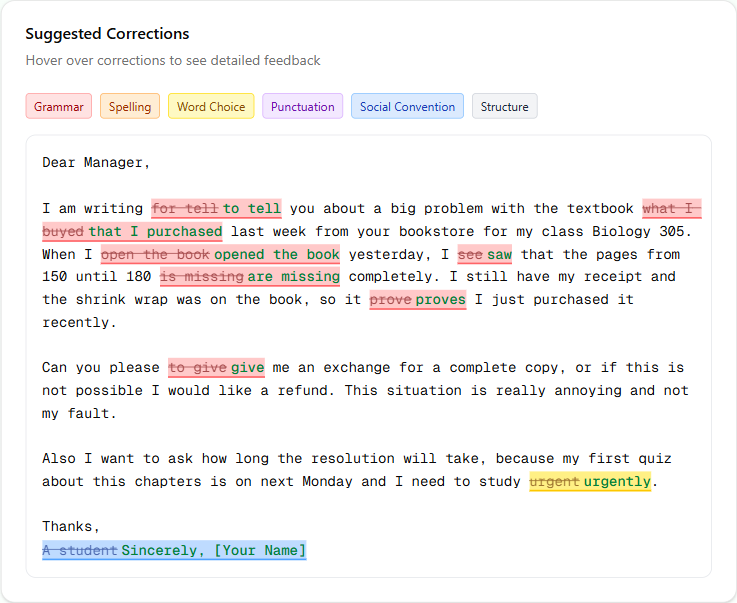
Work the inline fixes first, then reread the elaboration note for any point you left thin. Practice a mix of formal and informal prompts, and rewrite any email that came in under 80 words whatever it scored. It sits with the other eleven tasks on the practice hub.
Where to go from here
Tonight, set a 7-minute timer and write one email from this prompt: a classmate has asked to borrow your lecture notes from a class they missed; reply agreeing, set one condition, and suggest when to meet. Keep it to 110 words, read it aloud, and check it against the four self-evaluation questions above. Then make a daily Write an Email practice part of your routine. When this task feels steady, train the rest of the Writing section: tighten your TOEFL 2026 Writing timing so Build a Sentence runs fast enough to bank minutes for the Email and the longer Academic Discussion.
Footnotes
-
Magoosh. "TOEFL Write an Email: A Complete Guide (2026)". Accessed 2026-06-14. ↩ ↩2 ↩3 ↩4 ↩5 ↩6 ↩7 ↩8 ↩9 ↩10 ↩11 ↩12 ↩13 ↩14 ↩15 ↩16 ↩17 ↩18
-
ETS Official. "TOEFL iBT Writing Section". Accessed 2026-06-14. ↩ ↩2 ↩3
-
Magoosh. "TOEFL 2026 Changes". Accessed 2026-06-14. ↩
-
Study.com. "TOEFL Writing Section Practice Guide 2026: Master the New Writing Tasks". Accessed 2026-06-14. ↩ ↩2 ↩3 ↩4 ↩5
-
College Council. "TOEFL 2026 Writing: Build a Sentence, Write an Email, and Academic Discussion". Accessed 2026-06-14. ↩ ↩2 ↩3 ↩4
-
Arno. "TOEFL Write an Email: Complete Guide (TOEFL 2026 New Format)". Accessed 2026-06-14. ↩ ↩2 ↩3 ↩4 ↩5 ↩6 ↩7 ↩8
-
Study.com. "TOEFL iBT 2026: How Does the New TOEFL Scoring Work?". Accessed 2026-06-14. ↩
-
Writing30. "TOEFL Writing Scoring 2026: How to Get 25+ (Complete Guide)". Accessed 2026-06-14. ↩
-
LingoLeap. "TOEFL Email Writing 2026: Format, Topics and Scoring". Accessed 2026-06-14. ↩ ↩2